Merge all your documents
into a single PDF
Office documents, images, PDF files — everything merges with one click.
Works completely offline, your files stay on your computer only (no cloud processing).
Tailored for lawyers in Israel preparing agreements for signing or filing with the court.
Page numbering, automatic table of contents, cover page per appendix, all appendices merged into the main document — all in one court-ready PDF.
Everything in One Place
All the tools you need to merge, organize, and arrange documents — in one simple app
PDF Merge
Merge unlimited PDF files into one. Drag and drop, reorder, and merge.
Images & Office
Supports Word, Excel, PowerPoint, images (JPG, PNG, TIFF) — everything converts to PDF automatically.
Offline & Secure
Works completely without internet. Your documents stay on your computer — never uploaded to the cloud.
Page Numbers & Watermarks
Add page numbering, watermarks, and stamps — for lawyers and court-ready document filing.
Hebrew Interface
Full Hebrew interface. Tailored for the Israeli market and Hebrew-speaking professionals.
Organization Management
Set up logo, company name, and templates, with a built-in admin PIN to protect settings.
Privacy, Trust & Accuracy
Your documents stay with you — and the result is court-ready
100% local — files never leave your computer
All document processing runs on your computer only. No cloud upload, no server — the merge itself works even without an internet connection. Your files and the final output stay with you. Ideal for sensitive, confidential material.
Original quality preserved
The merge preserves the content and quality of your original documents, in the order you set. Compression is applied only if you choose it — no loss of legibility or detail.
Court-ready formatting
Continuous page numbering, an automatic table of contents, a cover page for each appendix, and all appendices merged into one file — ready to file in the required format.
Built for Lawyers
From drafting pleadings to filing with the court — all in one PDF
A pleading arrives with dozens of exhibits, each in a different format: scanned rulings, bank statements, contracts, images, and emails. Unifo merges them all into a single PDF — organized, paginated, and ready to file — without uploading anything to the internet.
- Merge the pleading and all exhibits into a single PDF
- Automatic table of contents linking to each exhibit
- A cover page for each exhibit ("Exhibit A", "Exhibit B"...)
- Continuous page numbering across the whole document
- Watermark or stamp (firm name, "true copy of the original")
- Agreements ready for signing or filing — in the required format
A Look Inside
Professional, intuitive interface — available in English and Hebrew
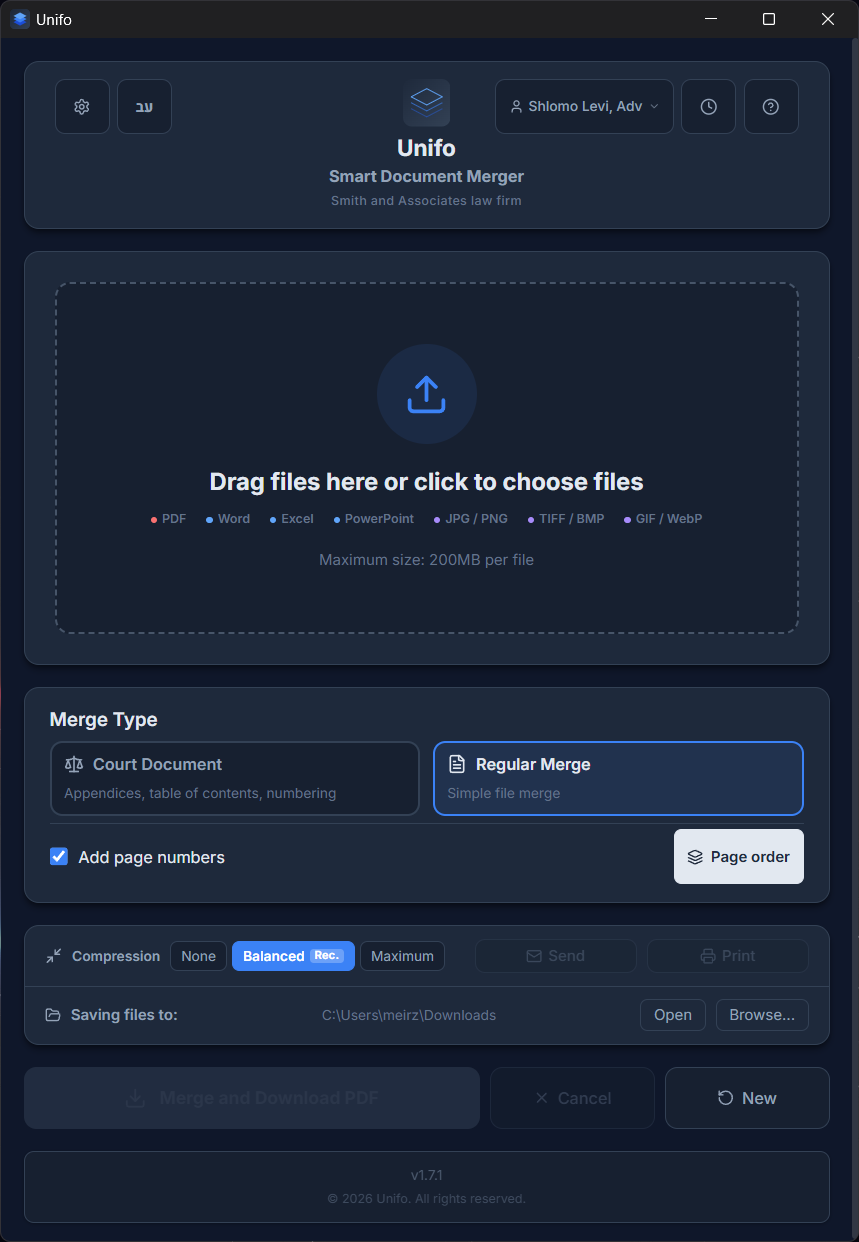
Main Interface — Simple & Fast
Drag files directly into the app. Supports PDF, Word, Excel, PowerPoint, images, and more.
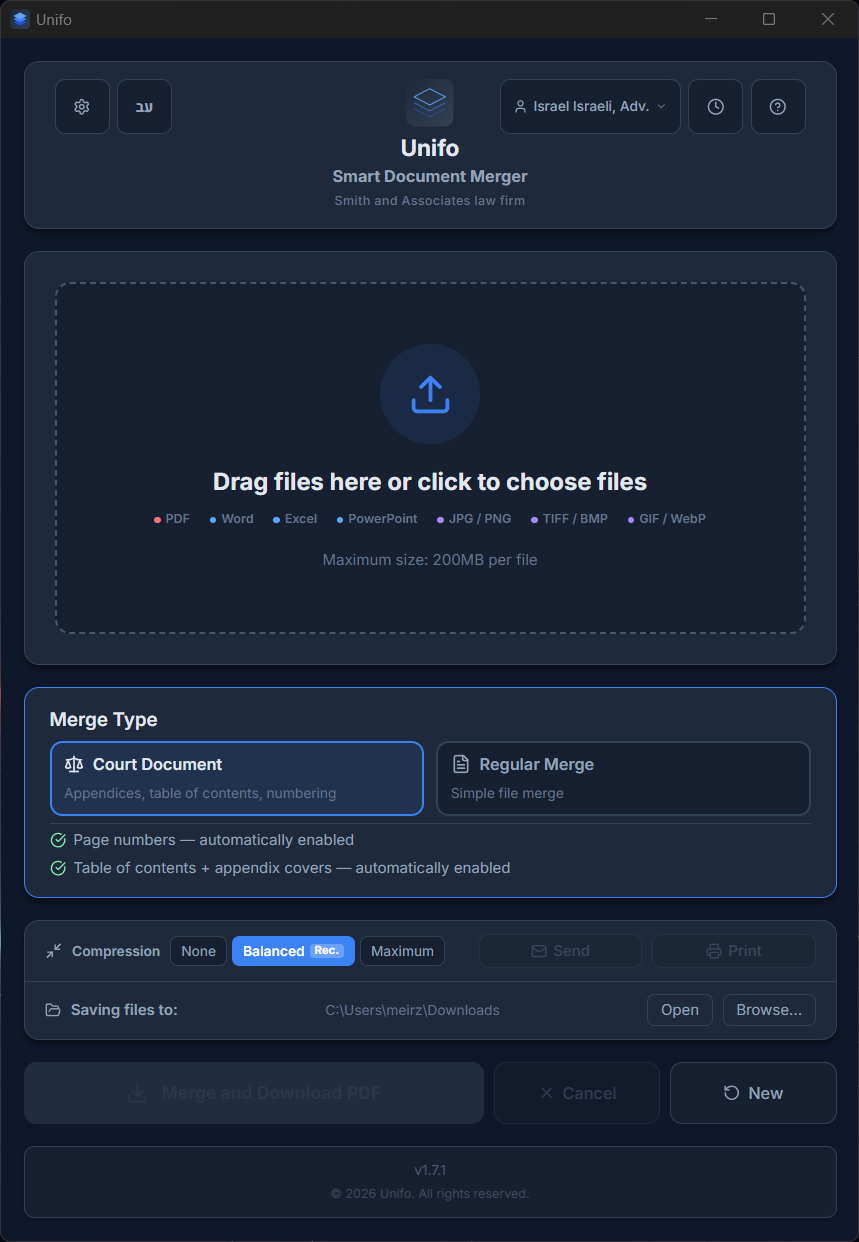
Court Document Mode
Dedicated mode for lawyers — automatic table of contents, appendix covers, and continuous page numbering.
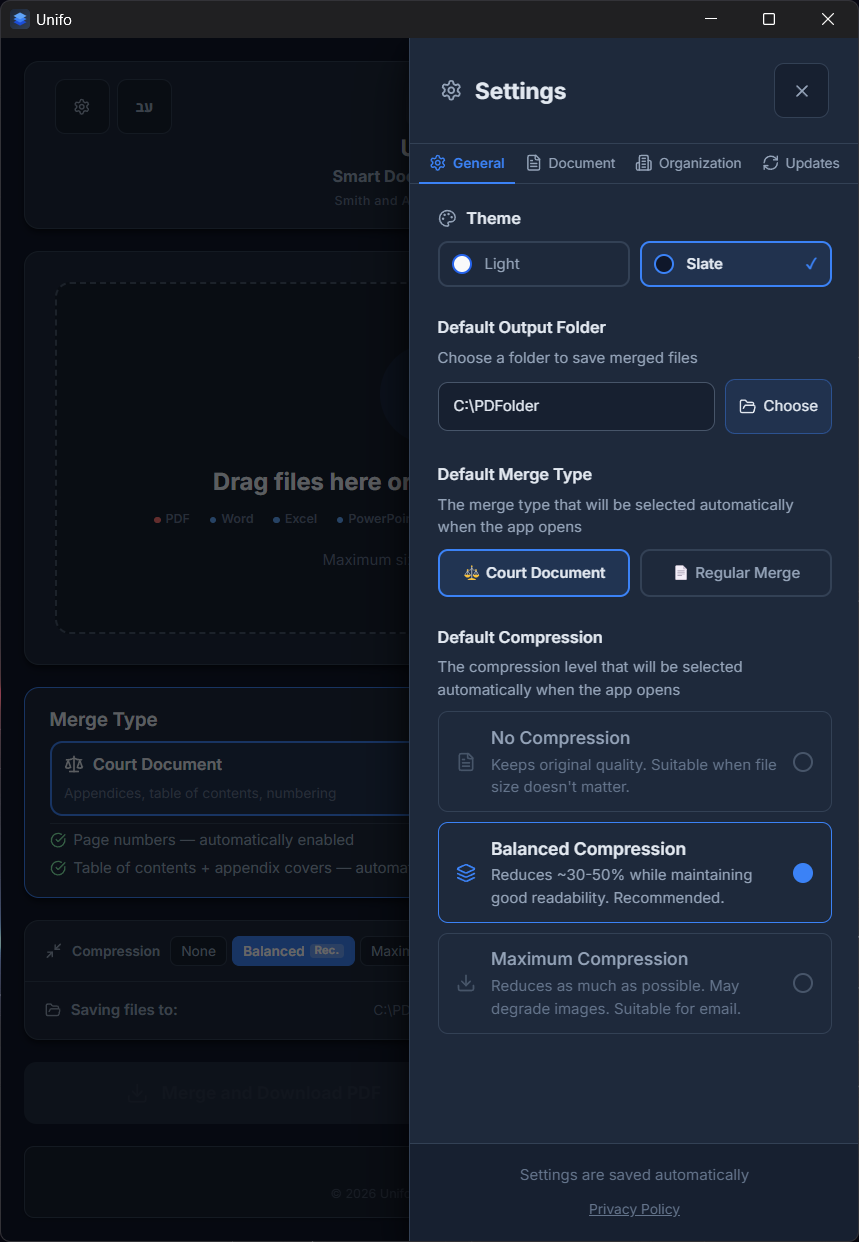
General Settings
Theme, output folder, compression level, and default merge type. Everything saves automatically.
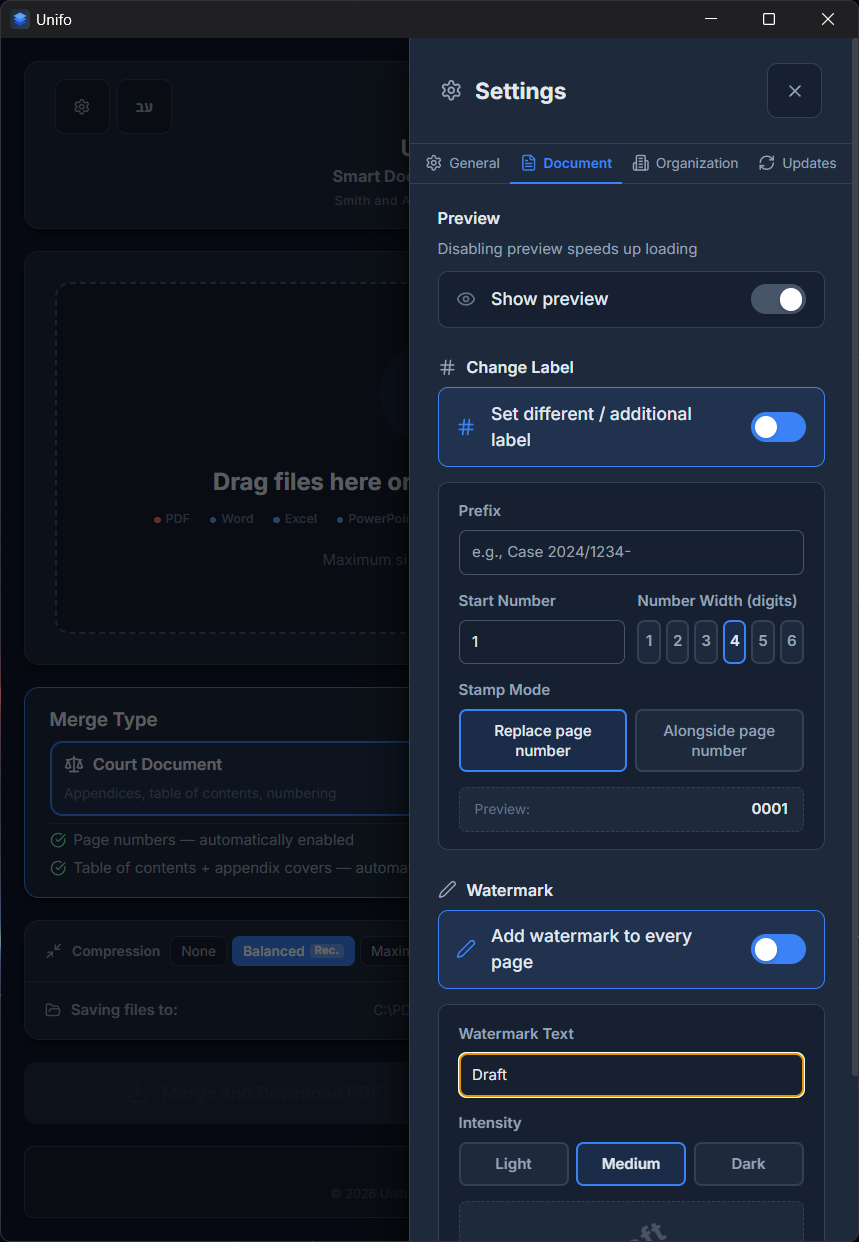
Page Numbers & Watermarks
Custom watermark (text, opacity, position) and page numbering with prefix.
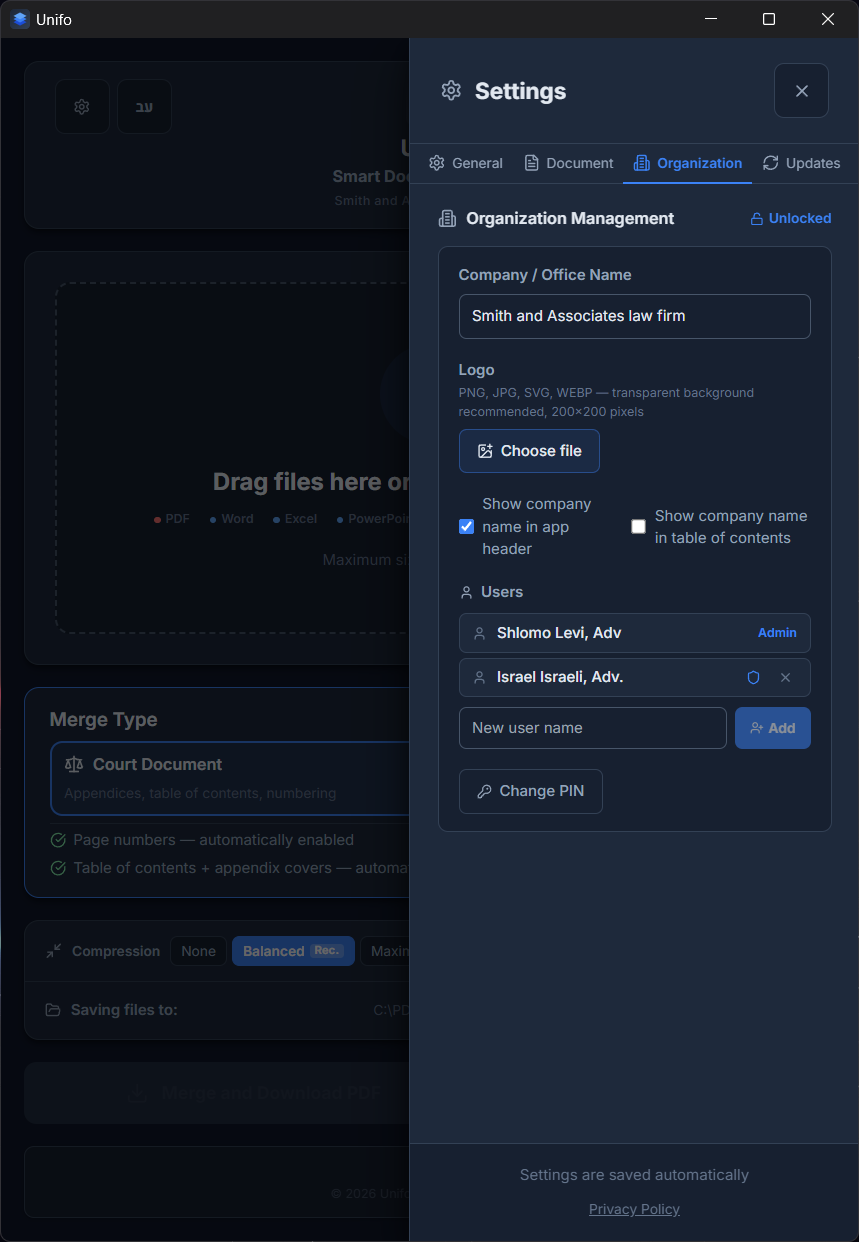
Organization Management
Set firm name, logo, and templates. Built-in license management and admin PIN.
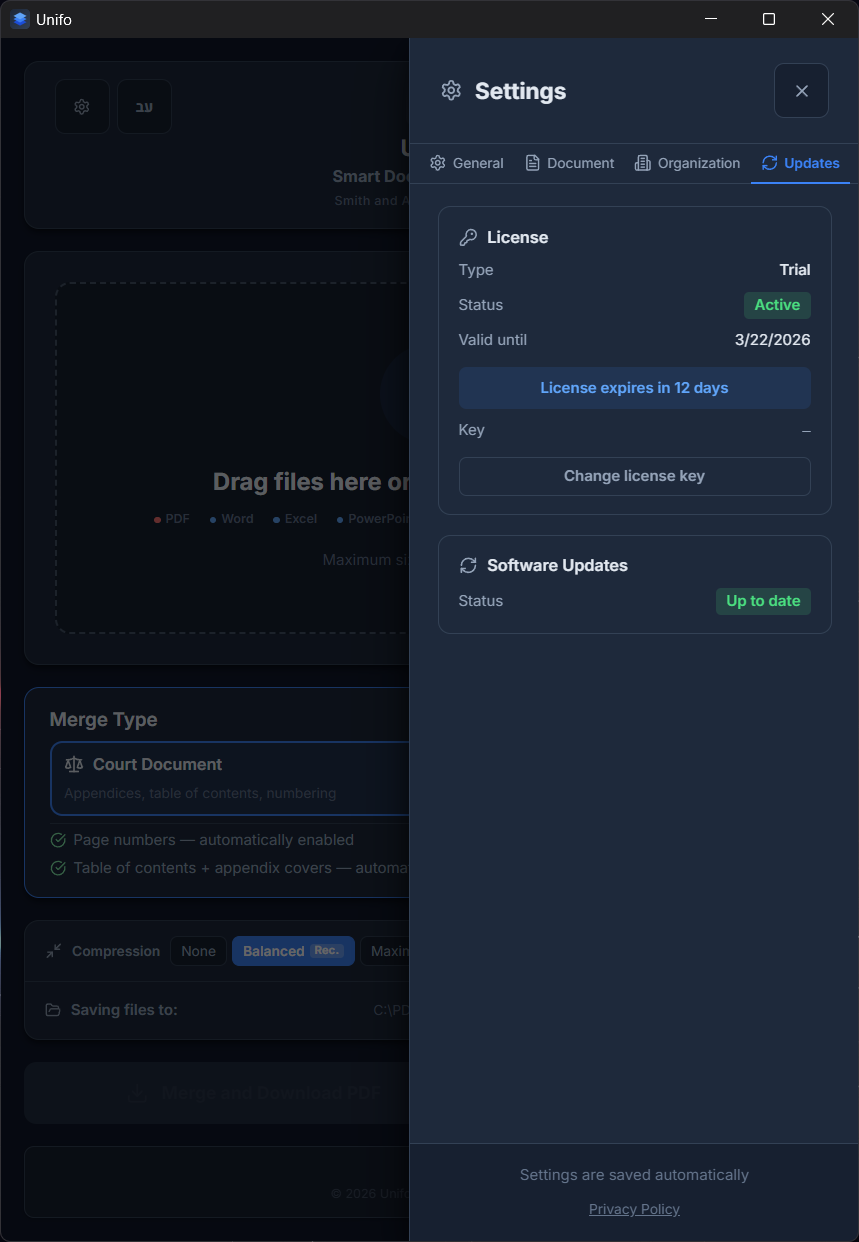
License & Updates
License management, activation key, and built-in automatic updates.
Frequently Asked Questions
Everything you wanted to know about Unifo — privacy, installation, formats, subscription, and support
General
What is Unifo?
Software that merges multiple documents — PDF files, images, and Office files — into a single, well-organized PDF. Purpose-built for lawyers preparing court filings: automatic table of contents, a cover page for each appendix, continuous page numbering, and watermarks.
Who is it for?
Anyone who combines multiple documents into one file — mainly lawyers, firms, and professionals. The interface is available in both English and Hebrew, with full right-to-left support.
Privacy & Security
Are my files sent to the internet?
No. All document processing happens on your computer only. Files are never uploaded to the cloud, sent to a server, or stored anywhere outside your computer. The merged file is also created locally.
Then why does it need an internet connection?
Document processing itself works completely offline. An internet connection is only needed to verify your license from time to time — and even then there's a grace period that lets you keep working without a network for a while.
Are the generated documents kept at original quality?
Yes. The merge preserves the content and quality of the original documents, in the order you set. Compression is applied only if you choose it, to reduce the file size.
Installation & Compatibility
Which operating systems does it work on?
Windows and macOS (Apple computers with Apple Silicon). The download automatically detects your system and offers the right version.
Windows shows a warning during installation — is that normal?
Yes. Because this is new software, Windows may show a SmartScreen warning. Click "More info" then "Run anyway". The software is safe to use.
Do I need Office installed to merge Word/Excel/PowerPoint files?
No. Unifo includes a built-in Office converter. If you need precise fidelity for complex formatting, you can install LibreOffice (free) — the app detects it automatically and uses it for higher accuracy.
Files & Formats
Which file types are supported?
PDF, Word (DOC/DOCX), Excel (XLS/XLSX), PowerPoint (PPT/PPTX), and images (JPG, PNG, GIF, BMP, TIFF, WEBP). All files convert to PDF automatically and merge into one file.
What's the maximum file size?
The default is up to 50MB per file, and up to roughly 200MB in total. In practice you can add larger files too, but this may affect the speed and efficiency of the merge (depending on your computer's performance), and in some cases may cause the merge to fail.
Plans & Payment
Is there a free trial?
Yes — 14 days free, with all features and no credit card required.
What happens after the trial ends?
As the trial nears its end the app alerts you, and you can subscribe right inside the app: Settings → "Licensing & Updates" tab → "Buy subscription", choose a plan (monthly or yearly) and complete a secure payment in your browser — the license then activates automatically within seconds, with no key to copy or paste. Even if the trial has already ended, the window that opens on launch lets you subscribe and keep working.
How much does it cost?
Monthly subscription: 59 ₪ incl. VAT per month. Annual subscription: 590 ₪ incl. VAT per year (two months free compared to the monthly plan).
How many computers can one license be installed on?
A single license is intended for one computer. Moving to another machine? You can remove the license from the old device yourself — Settings → "Licensing & Updates" → "Remove license from this device" — then enter the same key on the new computer. The license can also be expanded to several seats with the same key (no extra key needed); for a team or multiple devices, contact us.
How do I cancel a subscription?
You can cancel anytime right in the app: Settings → "Licensing & Updates" → "Cancel subscription". You keep access until the end of the paid period and won't be charged again, and you can undo the request if you change your mind. You can also cancel by email: info@unifo.co.il.
Support
How do I get in touch?
By email at info@unifo.co.il — we're happy to help with any question about installation, use, or licensing.
Plans & Pricing
Choose the plan that works for you
- This is the full software — every feature unlocked for a 14-day trial
- No commitment
* If Windows shows a warning — click "More info" then "Run anyway"
- All features — unlimited
- Court-document mode
- Page numbering, TOC & appendices
- Automatic updates
- Organization management (logo, templates, PIN)
Cancel anytime
- Everything in Monthly, plus:
- 2 months free every year
- Price locked for the full year
- One payment — less hassle
Cancel before annual renewal